FHIR Utilities
The fhir module makes FHIR resources easy to create, read, and validate. The underlying fhir.resources Pydantic models already enforce structure — required fields, types, unknown fields. The helpers add the three things structure alone can't give you:
- Flat constructors —
create_condition("Patient/123", code="38341003", display="Hypertension")instead of hand-building nestedReference→CodeableConcept→Codingstructures. Scalars in, the right terminology systems in the right places out. Flat signatures are also what make these functions servable as agent tools: a model can fill them reliably where it can't reliably emit deep nested FHIR JSON. - No invented facts — helpers never add clinical claims you didn't pass: no auto-generated timestamps, no guessed statuses. What enters the record is exactly what your code or model produced.
- Semantic validation — Pydantic doesn't check most value-set bindings (a spec-invalid status code passes structurally). Helpers check required bindings and warn on spec-invalid codes at build time, and
validate_resource(see Validation & Loading) returns the same checks as a report your code — or your agent's correction loop — can act on.
For profile conformance (US Core, UK Core) and full invariant checking, use a FHIR server's $validate operation — the helpers deliberately stop at what can be checked offline.
FHIR Version Support
HealthChain uses R4B by default — this matches most production EHRs. For most use cases, import from healthchain.fhir.r4b and don't think about versions:
FHIR resource classes are provided by the fhir.resources library. R4B is a minor ballot update to R4 with no breaking changes to core resources — it is compatible with R4 FHIR servers in practice.
Scope of version utilities
The version utilities below apply to dynamic resource loading and cross-version conversion. The create_* helpers always produce R4B resources. The FHIR gateway client always deserializes server responses as R4B.
Explicit version control
For cases where you need to load or convert resources in a specific version:
from healthchain.fhir import get_fhir_resource, fhir_version_context, convert_resource

# Get a resource class for a specific version
Patient_R4B = get_fhir_resource("Patient", "R4B")
Patient_R5 = get_fhir_resource("Patient", "R5")

# Temporarily switch the default version for get_fhir_resource calls
with fhir_version_context("STU3"):
    PatientSTU3 = get_fhir_resource("Patient")

# Convert between versions (serialize/deserialize — not lossless across major field renames)
patient_r5 = convert_resource(patient_r4b, "R5")
API Reference
| Function | Description |
|---|---|
get_fhir_resource(name, version) |
Get a resource class for a specific version |
get_default_version() |
Returns the current default version (R4B) |
fhir_version_context(version) |
Context manager for temporarily switching the default version |
convert_resource(resource, version) |
Convert a resource to a different version (best-effort, not lossless) |
get_resource_version(resource) |
Detect the FHIR version of an existing resource |
Resource Creation
FHIR is the modern de facto standard for storing and exchanging healthcare data, but working with FHIR resources can often involve complex and nested JSON structures with required and optional fields that vary between contexts.
Creating FHIR resources can involve a lot of boilerplate code, validation errors and manual comparison with FHIR specifications.
For example, as an ML practitioner, you may only care about extracting and inserting certain codes and texts within a FHIR resource. If you want to locate the SNOMED CT code for a medication, you may have to do something headache-inducing like:
medication_statement = {
    "resourceType": "MedicationStatement",
    "status": "active",  # required
    "medicationCodeableConcept": {  # required
        "coding": [
            {
                "system": "http://www.nlm.nih.gov/research/umls/rxnorm",
                "code": "1049221",
                "display": "Acetaminophen 325 MG Oral Tablet",
            }
        ]
    },
    "subject": {  # required
        "reference": "Patient/example"
    },
}

medication_statement["medicationCodeableConcept"]["coding"][0]["code"]
medication_statement["medicationCodeableConcept"]["coding"][0]["display"]
(And that's the easy case — if the resource uses medicationReference instead, you first have to find the referenced Medication elsewhere in the bundle. get_coded_entries() below handles both for you.)
Sensible Defaults for Resource Creation
The fhir create_* functions create FHIR resources with sensible defaults, automatically setting:
- A reference ID prefixed by "hc-" — pass generate_id=False to skip it when you need deterministic output (snapshot tests, evals)
- A status of "active" (or equivalent)
The helpers never invent clinical timestamps: fields like Observation.effectiveDateTime stay unset unless you pass them, so a resource only asserts times the caller can actually vouch for.
You can modify and manipulate these resources as you would any other Pydantic object after their creation.
Validation of FHIR Resources
Internally, HealthChain uses fhir.resources to validate FHIR resources, which is powered by Pydantic V2.
These helpers create minimal valid FHIR objects to help you get started easily, and log a warning if a produced resource contains a code outside a required value set. If you validate explicitly with validate_resource() on the same path, pass warn=False to the create_* helper so each issue is reported once.
ALWAYS check that the sensible defaults fit your needs, and validate your resource! Use validate_resource() to get an explicit validation report.
Serializing resources to JSON
model_dump() returns Python-mode values — FHIR date fields come back as datetime objects, which json.dumps cannot serialize. Whenever a resource crosses a JSON boundary (an API response, an agent tool return, a file), use model_dump(mode="json", exclude_none=True) or model_dump_json().
Overview
| Resource Type | Required Fields | Sensible Defaults | Common Use Cases |
|---|---|---|---|
| Condition | • clinicalStatus• subject |
• clinicalStatus: "active"• id: auto-generated with "hc-" prefix |
• Recording diagnoses • Problem list items • Active conditions |
| MedicationStatement | • subject• status• medication |
• status: "unknown"• id: auto-generated with "hc-" prefix |
• Current medications • Medication history • Prescribed medications |
| AllergyIntolerance | • patient |
• id: auto-generated with "hc-" prefix |
• Allergies • Intolerances • Adverse reactions |
| DocumentReference | • type |
• status: "current"• date: UTC now• description: default text• content.attachment.title: default text |
• Clinical notes • Lab reports • Imaging reports |
create_condition()
Creates a new Condition resource.
Required fields
Sensible Defaults
clinicalStatus is set to "active"
from healthchain.fhir import create_condition

# Create a condition representing hypertension
condition = create_condition(
    subject="Patient/123",
    code="38341003",
    display="Hypertension",
    system="http://snomed.info/sct",
    onset="2024-01-15",  # optional, sets onsetDateTime
)

# Output the created resource
print(condition.model_dump())
Example Output JSON
{
    "resourceType": "Condition",
    "id": "hc-3117bdce-bfab-4d71-968b-1ded900882ca",
    "clinicalStatus": {
        "coding": [{
            "system": "http://terminology.hl7.org/CodeSystem/condition-clinical",
            "code": "active",
            "display": "Active"
        }]
    },
    "code": {
        "coding": [{
            "system": "http://snomed.info/sct",
            "code": "38341003",
            "display": "Hypertension"
        }]
    },
    "subject": {
        "reference": "Patient/123"
    },
    "onsetDateTime": "2024-01-15"
}
create_medication_statement()
Creates a new MedicationStatement resource.
Required fields
Sensible Defaults
status is set to "unknown"
from healthchain.fhir import create_medication_statement

# Create a medication statement for Acetaminophen
medication = create_medication_statement(
    subject="Patient/123",
    code="1049221",
    display="Acetaminophen 325 MG Oral Tablet",
    system="http://www.nlm.nih.gov/research/umls/rxnorm",
)

# Output the created resource
print(medication.model_dump())
Dosage instructions can be attached with the dosage argument — pass a plain string for free-text instructions, or a structured Dosage built with create_dosage():
from healthchain.fhir import create_dosage, create_medication_statement

medication = create_medication_statement(
    subject="Patient/123",
    status="active",
    code="1049221",
    display="Acetaminophen 325 MG Oral Tablet",
    dosage="1 tablet twice daily",  # or create_dosage(...) / [Dosage, ...]
)
Example Output JSON
{
    "resourceType": "MedicationStatement",
    "id": "hc-86a26eba-63f9-4017-b7b2-5b36f9bad5f1",
    "status": "unknown",
    "medicationCodeableConcept": {
        "coding": [{
            "system": "http://www.nlm.nih.gov/research/umls/rxnorm",
            "code": "1049221",
            "display": "Acetaminophen 325 MG Oral Tablet"
        }]
    },
    "subject": {
        "reference": "Patient/123"
    }
}
create_dosage()
Creates a Dosage element for attaching to medication resources. Only the fields you provide are populated.
from healthchain.fhir import create_dosage, create_medication_statement

dosage = create_dosage(
    text="1 tablet twice daily",
    route_code="26643006",
    route_display="Oral route",
    dose_value=325.0,
    dose_unit="mg",
    frequency=2,
    period=1.0,
    period_unit="d",
)

medication = create_medication_statement(
    subject="Patient/123",
    status="active",
    code="1049221",
    display="Acetaminophen 325 MG Oral Tablet",
    dosage=dosage,
)
Example Output JSON (dosage element)
create_allergy_intolerance()
Creates a new AllergyIntolerance resource.
Required fields
Sensible Defaults
None (besides the auto-generated id)
from healthchain.fhir import create_allergy_intolerance

# Create an allergy intolerance record
allergy = create_allergy_intolerance(
    patient="Patient/123",
    code="418038007",
    display="Propensity to adverse reactions to substance",
    system="http://snomed.info/sct"
)

# Output the created resource
print(allergy.model_dump())
Example Output JSON
create_document_reference()
Creates a new DocumentReference resource. Handles base64 encoding of the attachment data.
Required fields
Sensible Defaults
typeis set to "collection"statusis set to "current"dateis set to the current UTC timestampdescriptionis set to "DocumentReference created by HealthChain"content[0].attachment.titleis set to "Attachment created by HealthChain"
from healthchain.fhir import create_document_reference

# Create a document reference with a simple text attachment
doc_ref = create_document_reference(
    data="Hello World",
    content_type="text/plain",
    description="A simple text document"
)

# Output the created resource
print(doc_ref.model_dump())
Example Output JSON
{
    "resourceType": "DocumentReference",
    "id": "hc-60fcfdad-9617-4557-88d8-8c8db9b9fe70",
    "status": "current",
    "date": "2025-02-28T14:55:33+00:00",
    "description": "A simple text document",
    "content": [{
        "attachment": {
            "contentType": "text/plain",
            "data": "SGVsbG8gV29ybGQ=",
            "title": "Attachment created by HealthChain",
            "creation": "2025-02-28T14:55:33+00:00"
        }
    }]
}
Utilities
set_condition_category()
Sets the category of a Condition resource to "problem-list-item".
from healthchain.fhir import set_condition_category, create_condition

# Create a condition and set it as a problem list item
problem_list_item = create_condition(
    subject="Patient/123",
    code="38341003",
    display="Hypertension"
)

set_condition_category(problem_list_item)

# Output the modified resource
print(problem_list_item.model_dump())
Example Output JSON
{
    "resourceType": "Condition",
    "id": "hc-3d5f62e7-729b-4da1-936c-e8e16e5a9358",
    "clinicalStatus": {
        "coding": [{
            "system": "http://terminology.hl7.org/CodeSystem/condition-clinical",
            "code": "active",
            "display": "Active"
        }]
    },
    "category": [{
        "coding": [{
            "system": "http://terminology.hl7.org/CodeSystem/condition-category",
            "code": "problem-list-item",
            "display": "Problem List Item"
        }]
    }],
    "code": {
        "coding": [{
            "system": "http://snomed.info/sct",
            "code": "38341003",
            "display": "Hypertension"
        }]
    },
    "subject": {
        "reference": "Patient/123"
    }
}
read_content_attachment()
Reads attachments from a DocumentReference in a human-readable format.
from healthchain.fhir import read_content_attachment

attachments = read_content_attachment(document_reference)
# Returns a list of dictionaries containing:
# [
#     {
#         "data": "Hello World",
#         "metadata": {
#             "content_type": "text/plain",
#             "title": "My Document",
#             "creation": datetime.datetime(2025, 2, 28, 15, 27, 55, tzinfo=TzInfo(UTC)),
#         },
#     }
# ]
Bundle Operations
FHIR Bundles are containers that can hold multiple FHIR resources together. They are commonly used to group related resources or to send/receive multiple resources in a single request.
The bundle operations make it easy to:
- Create and manage bundles
- Add or update resources within bundles
- Retrieve specific resource types from bundles
- Work with multiple resource types in a single bundle
create_bundle()
Creates a new Bundle resource.
Required field
Sensible Defaults
type is set to "collection"
from healthchain.fhir import create_bundle

# Create an empty bundle
bundle = create_bundle(bundle_type="collection")

# Output the created resource
print(bundle.model_dump())
add_resource()
Adds a single resource to a Bundle.
from healthchain.fhir import add_resource, create_condition, create_bundle

# Create a condition to add to the bundle
condition = create_condition(
    subject="Patient/123",
    code="38341003",
    display="Hypertension"
)

# Create a bundle and add the condition
bundle = create_bundle()
add_resource(bundle, condition)

# Output the modified bundle
print(bundle.model_dump())
Example Output JSON
{
    "resourceType": "Bundle",
    "type": "collection",
    "entry": [{
        "resource": {
            "resourceType": "Condition",
            "id": "hc-3117bdce-bfab-4d71-968b-1ded900882ca",
            "clinicalStatus": {
                "coding": [{
                    "system": "http://terminology.hl7.org/CodeSystem/condition-clinical",
                    "code": "active",
                    "display": "Active"
                }]
            },
            "code": {
                "coding": [{
                    "system": "http://snomed.info/sct",
                    "code": "38341003",
                    "display": "Hypertension"
                }]
            },
            "subject": {
                "reference": "Patient/123"
            }
        }
    }]
}
Field Descriptions
| Field | Required | Description |
|---|---|---|
entry |
- | Array of resources in the bundle |
entry[].resource |
✓ | The FHIR resource being added |
entry[].fullUrl |
- | Optional full URL for the resource |
get_resources()
Retrieves all resources of a specific type from a Bundle.
from healthchain.fhir import get_resources

# Get all conditions in the bundle
conditions = get_resources(bundle, "Condition")

# Or using the resource type directly
from healthchain.fhir.r4b import Condition
conditions = get_resources(bundle, Condition)

for condition in conditions:
    print(f"Found condition: {condition.code.coding[0].display}")
resolve_reference()
Resolves a FHIR Reference to its target resource within a bundle — the read-side counterpart to add_resource().
Handles the reference styles found in real bundles:
urn:uuid:...fullUrls (Synthea transaction bundles)- Relative
Type/idreferences, including against absolute fullUrl tails - Contained resources (
#id), via theparentargument
from healthchain.fhir import get_resources, load_bundle, resolve_reference

bundle = load_bundle("synthea_patient.json")

med_request = get_resources(bundle, "MedicationRequest")[0]

# Resolve the medication the request points to
medication = resolve_reference(bundle, med_request.medicationReference)
print(medication.code.coding[0].display)

# Contained references need the owning resource as parent
requester = resolve_reference(bundle, "#requester-1", parent=med_request)
Never raises
resolve_reference is a best-effort read helper: unresolvable or malformed references return None rather than raising.
set_resources()
Sets or updates resources of a specific type in a Bundle.
from healthchain.fhir import set_resources, create_condition

# Create some conditions
conditions = [
    create_condition(
        subject="Patient/123",
        code="38341003",
        display="Hypertension"
    ),
    create_condition(
        subject="Patient/123",
        code="44054006",
        display="Diabetes"
    )
]

# Replace all existing conditions with new ones
set_resources(bundle, conditions, "Condition", replace=True)

# Or append new conditions to existing ones
set_resources(bundle, conditions, "Condition", replace=False)
Bundle with Multiple Conditions
{
    "resourceType": "Bundle",
    "type": "collection",
    "entry": [
        {
            "resource": {
                "resourceType": "Condition",
                "id": "hc-3117bdce-bfab-4d71-968b-1ded900882ca",
                "clinicalStatus": {
                    "coding": [{
                        "system": "http://terminology.hl7.org/CodeSystem/condition-clinical",
                        "code": "active",
                        "display": "Active"
                    }]
                },
                "code": {
                    "coding": [{
                        "system": "http://snomed.info/sct",
                        "code": "38341003",
                        "display": "Hypertension"
                    }]
                },
                "subject": {"reference": "Patient/123"}
            }
        },
        {
            "resource": {
                "resourceType": "Condition",
                "id": "hc-9876fedc-ba98-7654-3210-fedcba987654",
                "clinicalStatus": {
                    "coding": [{
                        "system": "http://terminology.hl7.org/CodeSystem/condition-clinical",
                        "code": "active",
                        "display": "Active"
                    }]
                },
                "code": {
                    "coding": [{
                        "system": "http://snomed.info/sct",
                        "code": "44054006",
                        "display": "Diabetes"
                    }]
                },
                "subject": {"reference": "Patient/123"}
            }
        }
    ]
}
merge_bundles()
Merges multiple FHIR Bundle resources into a single bundle.
- Resources from each bundle are combined into a single output bundle of
type: collection. - All entries from all input bundles will appear in the resulting bundle's
entryarray. - If bundles have the same resource (e.g. matching
idor identical resources), they will all be included unless you handle duplicates before/after callingmerge_bundles.
from healthchain.fhir import merge_bundles, create_bundle, create_condition

# Create two bundles with different resources
bundle1 = create_bundle()
add_resource(bundle1, create_condition(
    subject="Patient/123", code="38341003", display="Hypertension"
))
bundle2 = create_bundle()
add_resource(bundle2, create_condition(
    subject="Patient/123", code="44054006", display="Diabetes"
))

# Merge the bundles together
merged = merge_bundles(bundle1, bundle2)

# Output the merged bundle
print(merged.model_dump())
Example Output JSON
{
  "resourceType": "Bundle",
  "type": "collection",
  "entry": [
    {
      "resource": {
        "resourceType": "Condition",
        "id": "hc-3117bdce-bfab-4d71-968b-1ded900882ca",
        "clinicalStatus": {
          "coding": [{
            "system": "http://terminology.hl7.org/CodeSystem/condition-clinical",
            "code": "active",
            "display": "Active"
          }]
        },
        "code": {
          "coding": [{
            "system": "http://snomed.info/sct",
            "code": "38341003",
            "display": "Hypertension"
          }]
        },
        "subject": { "reference": "Patient/123" }
      }
    },
    {
      "resource": {
        "resourceType": "Condition",
        "id": "hc-9876fedc-ba98-7654-3210-fedcba987654",
        "clinicalStatus": {
          "coding": [{
            "system": "http://terminology.hl7.org/CodeSystem/condition-clinical",
            "code": "active",
            "display": "Active"
          }]
        },
        "code": {
          "coding": [{
            "system": "http://snomed.info/sct",
            "code": "44054006",
            "display": "Diabetes"
          }]
        },
        "subject": { "reference": "Patient/123" }
      }
    }
  ]
}
Reading Coded Entries
Reading clinical data out of a bundle usually means walking nested CodeableConcepts, special-casing medication[x], and chasing references. get_coded_entries() does that walk for you and returns flat, JSON-serializable records — designed for feeding summaries, ML features, or agent tools.
get_coded_entries()
Returns a CodedEntry record for each resource of the requested type(s):
from healthchain.fhir import get_coded_entries, load_bundle

bundle = load_bundle("synthea_patient.json")

for entry in get_coded_entries(bundle, "Condition", status="active"):
    print(entry.code, entry.display, entry.system, entry.authored_on)

# Multiple types in one call
entries = get_coded_entries(bundle, ["Condition", "Observation"])
Each CodedEntry is a Pydantic model with:
| Field | Description |
|---|---|
code / display / system |
From the first coding (display falls back to the concept text) |
codings |
All codings of the concept, not just the first |
status |
Resource status — for Condition/AllergyIntolerance this is the clinicalStatus code, and the status filter matches it |
resource_type / resource_id |
Where the entry came from |
subject |
The subject/patient reference string |
authored_on |
First of authoredOn/effectiveDateTime/occurrenceDateTime/recordedDate, ISO 8601 |
value / unit |
valueQuantity for value-bearing Observations |
What's included
Concepts with text but no codings are included as display-only entries (code=None) — common for AI-extracted data that hasn't been coded yet. Resources with no coded identity at all are skipped.
get_medications()
Sugar over get_coded_entries() spanning MedicationStatement and MedicationRequest. medicationCodeableConcept is read directly; medicationReference is resolved within the bundle (including contained Medication resources), so referenced medications are first-class instead of silently missing.
from healthchain.fhir import get_medications

for med in get_medications(bundle, status="active"):
    print(med.code, med.display)  # e.g. 313782 Acetaminophen 325 MG Oral Tablet

# Serialize for an agent tool or API response
payload = [med.model_dump() for med in get_medications(bundle)]
Validation & Loading
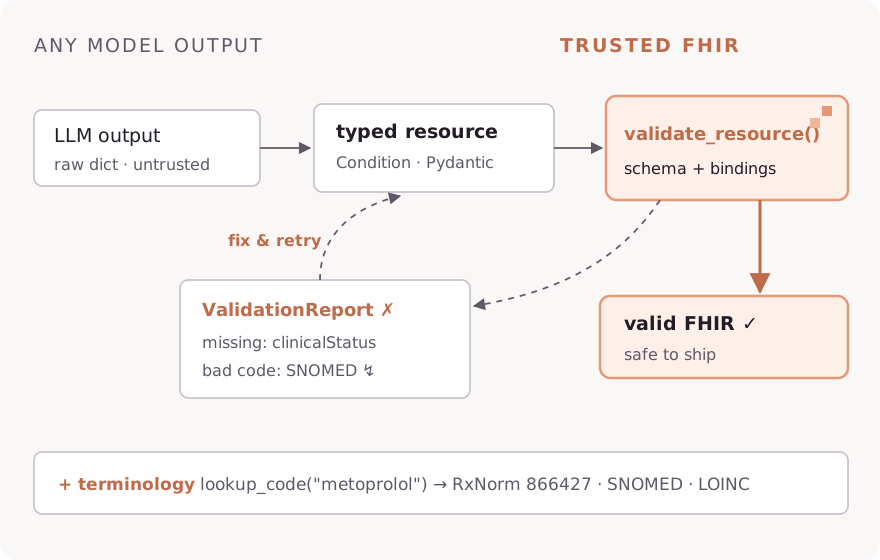
Constructing a resource through fhir.resources validates structure (types, required fields, cardinality) — but it does not check required terminology bindings, and it reports problems by raising Pydantic exceptions. These helpers give you validation as data you can act on: a report for agent loops and UIs, or a single rich exception for loaders.
What is and isn't checked
Checked: structure (via the Pydantic models) and required bindings on primitive code fields (e.g. MedicationStatement.status).
Not checked: ValueSet bindings on CodeableConcept/Coding fields, FHIRPath invariants, profile conformance (US Core, UK Core), and reference integrity. For full conformance validation, use a FHIR server's $validate operation against the relevant profiles.
validate_resource()
Validates a resource (dict or instance) and returns a ValidationReport — it never raises, so it can sit directly in an agent's build-validate-correct loop.
from healthchain.fhir import validate_resource

report = validate_resource({
    "resourceType": "MedicationStatement",
    "status": "recorded",  # R5 vocabulary — invalid in R4B!
    "subject": {"reference": "Patient/123"},
    "medicationCodeableConcept": {"text": "Aspirin"},
})

print(report.valid)  # False
for issue in report.issues:
    print(issue.severity, issue.expression, issue.diagnostics)
# error MedicationStatement.status Value 'recorded' is not in the required value set. ...
The report mirrors FHIR's own $validate output shape (severity / code / diagnostics / expression per issue), serializes with model_dump(), and converts to a real OperationOutcome with report.to_operation_outcome(). Validation is version-aware — pass version="R5" to validate against R5 instead of the session default.
load_bundle()
Loads a Bundle from a file path, JSON string, or dict — loudly. Every entry is validated independently and all problems are aggregated into one FHIRValidationError, with expressions locating the offending entry.
from healthchain.fhir import FHIRValidationError, load_bundle

try:
    bundle = load_bundle("synthea_patient.json")
except FHIRValidationError as e:
    for issue in e.report.issues:
        print(issue.expression, issue.diagnostics)
    # Bundle.entry[2].resource.subject  Field required
Compare with create_resource_from_dict(), which returns None on failure by default — pass raise_on_error=True to get the same FHIRValidationError + report behavior for single resources.
Common Patterns
Working with Multiple Resource Types
This example shows how to work with multiple types of FHIR resources in a single bundle.
from healthchain.fhir import (
    create_bundle,
    create_condition,
    create_medication_statement,
    create_allergy_intolerance,
    get_resources,
    set_resources,
)

# Create a bundle to hold patient data
bundle = create_bundle()

# Add conditions (diagnoses)
conditions = [
    create_condition(
        subject="Patient/123",
        code="38341003",
        display="Hypertension"
    ),
    create_condition(
        subject="Patient/123",
        code="44054006",
        display="Diabetes"
    )
]
set_resources(bundle, conditions, "Condition")

# Add medications
medications = [
    create_medication_statement(
        subject="Patient/123",
        code="1049221",
        display="Acetaminophen 325 MG"
    )
]
set_resources(bundle, medications, "MedicationStatement")

# Add allergies
allergies = [
    create_allergy_intolerance(
        patient="Patient/123",
        code="418038007",
        display="Penicillin allergy"
    )
]
set_resources(bundle, allergies, "AllergyIntolerance")

# Later, retrieve resources by type
conditions = get_resources(bundle, "Condition")
medications = get_resources(bundle, "MedicationStatement")
allergies = get_resources(bundle, "AllergyIntolerance")
Complete Bundle Example Output
{
    "resourceType": "Bundle",
    "type": "collection",
    "entry": [
        {
            "resource": {
                "resourceType": "Condition",
                "id": "hc-3117bdce-bfab-4d71-968b-1ded900882ca",
                "clinicalStatus": {
                    "coding": [{
                        "system": "http://terminology.hl7.org/CodeSystem/condition-clinical",
                        "code": "active",
                        "display": "Active"
                    }]
                },
                "code": {
                    "coding": [{
                        "system": "http://snomed.info/sct",
                        "code": "38341003",
                        "display": "Hypertension"
                    }]
                },
                "subject": {"reference": "Patient/123"}
            }
        },
        {
            "resource": {
                "resourceType": "Condition",
                "id": "hc-9876fedc-ba98-7654-3210-fedcba987654",
                "clinicalStatus": {
                    "coding": [{
                        "system": "http://terminology.hl7.org/CodeSystem/condition-clinical",
                        "code": "active",
                        "display": "Active"
                    }]
                },
                "code": {
                    "coding": [{
                        "system": "http://snomed.info/sct",
                        "code": "44054006",
                        "display": "Diabetes"
                    }]
                },
                "subject": {"reference": "Patient/123"}
            }
        },
        {
            "resource": {
                "resourceType": "MedicationStatement",
                "id": "hc-86a26eba-63f9-4017-b7b2-5b36f9bad5f1",
                "status": "unknown",
                "medicationCodeableConcept": {
                    "coding": [{
                        "system": "http://www.nlm.nih.gov/research/umls/rxnorm",
                        "code": "1049221",
                        "display": "Acetaminophen 325 MG"
                    }]
                },
                "subject": {"reference": "Patient/123"}
            }
        },
        {
            "resource": {
                "resourceType": "AllergyIntolerance",
                "id": "hc-65edab39-d90b-477b-bdb5-a173b21efd44",
                "code": {
                    "coding": [{
                        "system": "http://snomed.info/sct",
                        "code": "418038007",
                        "display": "Penicillin allergy"
                    }]
                },
                "patient": {"reference": "Patient/123"}
            }
        }
    ]
}