Build a CDS Hooks Service for Discharge Summarization
Level: Beginner
This example shows you how to build a CDS service that integrates with EHR systems. We'll automatically summarize discharge notes and return actionable recommendations using the CDS Hooks standard.
Check out the full working example here!
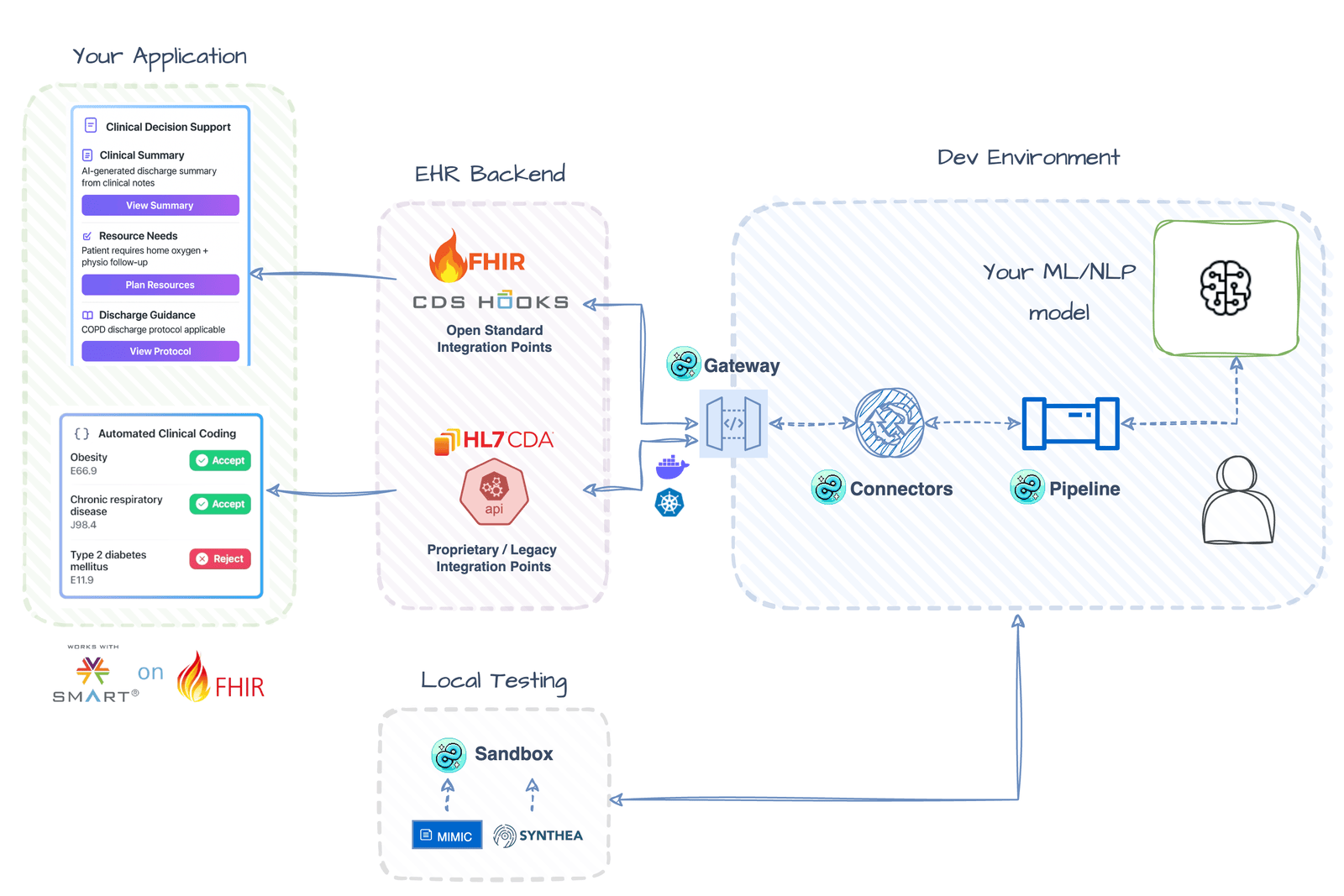 Illustrative Architecture - actual implementation may vary.
Setup
Install Dependencies
The [examples] extra provides transformers, and [sandbox] provides the test data generator used to fire sample requests. The model runs locally — no API tokens or accounts needed.
Download Sample Data
Download the sample data discharge_notes.csv into a data/ folder in your project root using wget:
mkdir -p data
cd data
wget https://github.com/healthchainai/HealthChain/raw/main/cookbook/data/discharge_notes.csv
Build the Summarization Pipeline
First, we'll build the summarization pipeline: run the model in a single Pipeline node that summarizes the note and builds the CDS Card inline.
from transformers import pipeline as hf_pipeline

from healthchain.io import Document
from healthchain.models import Card, Source
from healthchain.pipeline import Pipeline

summarizer = hf_pipeline("summarization", model="sshleifer/distilbart-cnn-12-6")
pipeline = Pipeline()

@pipeline.add_node
def summarize_to_card(doc: Document) -> Document:
    if not doc.text:
        return doc

    summary = summarizer(doc.text)[0]["summary_text"]

    doc.cds.cards = [
        Card(
            summary=summary[:140],  # CDS Hooks caps summary at 140 chars
            indicator="info",
            source=Source(label="Discharge Note Summarizer"),
            detail=summary,
        )
    ]
    return doc
The model runs inside your node — HealthChain's job is the protocol on either side: the adapter parses FHIR out of the CDS Hooks request and formats your validated Card back into a spec-compliant response.
Prefer an LLM?
The node body is yours — swap the transformer call for any LangChain chain or LLM client and build the same Card from its output. The FHIR-Grounded Patient Q&A cookbook shows the LLM-in-a-node pattern end to end.
Add the CDS FHIR Adapter
The CdsFhirAdapter converts between CDS Hooks requests and HealthChain's Document format. This makes it easy to work with FHIR data in CDS workflows.
from healthchain.io import CdsFhirAdapter

cds_adapter = CdsFhirAdapter()

# Parse the CDS request to a Document object
cds_adapter.parse(request)

# Format the Document object back to a CDS response
cds_adapter.format(doc)
What this adapter does
- Parses FHIR resources from CDS Hooks requests
- Extracts text from DocumentReference resources
- Formats responses as CDS cards according to the CDS Hooks specification
Set Up the CDS Hook Handler
Create the CDS Hooks handler to receive discharge note requests, run the AI summarization pipeline, and return results as CDS cards.
from healthchain.gateway import CDSHooksService
from healthchain.models import CDSRequest, CDSResponse

# Initialize the CDS service
cds_service = CDSHooksService()

# Define the CDS service function
@cds_service.hook("encounter-discharge", id="discharge-summarizer")
def handle_discharge_summary(request: CDSRequest) -> CDSResponse:
    """Process discharge summaries with AI"""
    # Parse CDS request to internal Document format
    doc = cds_adapter.parse(request)

    # Process through AI pipeline
    processed_doc = pipeline(doc)

    # Format response with CDS cards
    response = cds_adapter.format(processed_doc)
    return response
Build the Service
Register the CDS service with HealthChainAPI to create REST endpoints:
from healthchain.gateway import HealthChainAPI

app = HealthChainAPI(title="Discharge Summary CDS Service")
app.register_service(cds_service)
Test with Sample Data
HealthChain provides a sandbox client utility which simulates the CDS hooks workflow end-to-end. It loads your sample free text data and formats it into CDS requests, sends it to your service, and saves the request/response exchange in an output/ directory. This lets you test the complete integration locally and inspect the inputs and outputs before connecting to a real EHR instance.
# load_free_text() converts discharge notes into FHIR DocumentReferences
# and wraps them in CDS requests for the encounter-discharge workflow
client.load_free_text(
    csv_path="data/discharge_notes.csv",
    column_name="text"
)

# Inspect requests before sending to verify data
# for request in client.requests:
#     print(request.prefetch.get('document'))  # Get DocumentReference
Learn More About Test Data Generation
Read more about the test FHIR data generator for CDS hooks here
Run the Complete Example
Pass the hook ID you registered with @cds.hook(..., id="discharge-summarizer") — HealthChain resolves the service URL and workflow automatically:
with app.sandbox("discharge-summarizer") as client:
    client.load_free_text(
        csv_path="data/discharge_notes.csv",
        column_name="text"
    )
    responses = client.send_requests()
    client.save_results("./output/")
Service Endpoints
Once running, your service will be available at:
- Service discovery:
http://localhost:8000/cds-services - Discharge summary endpoint:
http://localhost:8000/cds/cds-services/discharge-summarizer
Example CDS Response
{
  "cards": [
    {
      "summary": "Discharge Transportation",
      "indicator": "info",
      "source": {
        "label": "HealthChain Discharge Assistant"
      },
      "detail": "• Transport arranged for 11:00 HRs\n• Requires bariatric ambulance and 2 crew members\n• Confirmation number: TR-2024-001"
    },
    {
      "summary": "Medication Management",
      "indicator": "warning",
      "source": {
        "label": "HealthChain Discharge Assistant"
      },
      "detail": "• Discharge medications: Apixaban 5mg, Baclofen 20mg MR\n• New anticoagulation card prepared\n• Collection by daughter scheduled"
    }
  ]
}
What You've Built
A CDS Hooks service for discharge workflows that integrates seamlessly with EHR systems:
- Standards-compliant - Implements the CDS Hooks specification for EHR interoperability
- AI-powered summarization - Processes discharge notes using transformer models or LLMs
- Actionable recommendations - Returns structured cards with discharge planning tasks
- Flexible pipeline - Supports both fine-tuned models and prompt-engineered LLMs
- Auto-discovery - Provides service discovery endpoint for EHR registration
Use Cases
-
Discharge Planning Coordination Automatically extract and highlight critical discharge tasks (appointments, medications, equipment needs) to reduce care coordination errors and readmissions.
-
Clinical Decision Support Provide real-time recommendations during discharge workflows, surfacing potential issues like medication interactions or missing follow-up appointments.
-
Documentation Efficiency Generate concise discharge summaries from lengthy clinical notes, saving clinicians time while ensuring all critical information is captured.
Next Steps
- Enhance prompts: Tune your clinical prompts to extract specific discharge criteria or care plan elements.
- Add validation: Implement checks for required discharge elements (medications, follow-ups, equipment).
- Multi-card support: Expand to generate separate cards for different discharge aspects (medication reconciliation, transportation, follow-up scheduling).
- Integrate with workflows: Deploy to Epic App Orchard or Cerner Code Console for production EHR integration.
- Go to production: Scaffold a project with
healthchain newand run withhealthchain serve— see From cookbook to service.